Showing posts with label ollydbg. Show all posts

Monday, January 4, 2016

Bypassing Protections: Reversing and Recreating a Protected DLL


Hello and welcome to this new series called Bypassing Protections. Together, we will learn some new methods to bypass protections which have certain flaws in their implementation. In this example, we will look at an dll which is protected with asprotect and use a simple method to recreate it. Since this protected dll only performs license check procedures, it is very easy for us to recreate the dll in Delphi, bypassing the protection all together. In some applications, the authors like to place all of the license management code into a single dll which all modules of the application reference to determine if the it is registered. Since this handles all license management, this becomes the Achilles heel in the application. Together, we will reverse engineer this small dll and recreate all of the functions and procedures in delphi so that they always return that correct values. Due to legal purposes, I will not mention the name of this application in the article, but will include pictures that will clearly help you determine which application this tutorial is based upon.


Let's download the application. When you run it, you are met with this screen. Probing through the directory with protectionID, you will soon discover that the dll named ba8pro is protected with ASProtect. Let's view the export table of ba8pro in PETools and see what functions and procedures it contains.


As we can see, this only contains 4 procedures. If we check the main executable, we see that there are no import references to this dll and that on startup, this dll is not in memory. That means that it likely loads this dll using the LoadLibrary function and obtains the procedure VA using GetProcAddress. Since this is the case, we can find where these procedures are called by simply searching for string references of the function names. When we load the main executable in ollydbg, we can already see the ba8pro dll referenced in the main procedure. Below that we can see references to CheckVersion and CheckDays.
After we step to the point which I labeled Call To CheckVersion, we notice nothing is pushed onto the stack before we call this function. Therefore, we can conclude that the CheckVersion function does not take parameters. After this procedure, we return the value of $FFFFFFFF to EAX and store it at 5D9B04. Since we move the full EAX register to this value, we can conclude that CheckVersion Return an Integer. After playing around, I discovered that if we return a 0 from CheckVersion, it will run as registered. Therefore, we can recreate this dll function in Delphi like this:

Function CheckVersion(): Integer; stdcall;
Begin
Result:=0; //pro
End;

The next function CheckDays works the same way. It does not take parameters and returns the number of days as an integer. We can declare it like this:

Function CheckDays():Integer;  stdcall;
Begin
 Result:=255; //Any value greater than 0 and <= $7FFFFFFF will work
End;

Next, we will look at the function GetModeVersion. After a quick string search for GetModeVersion, we should arrive here:


Let's toggle a breakpoint here, run the application, go to help, and click the about button. This will cause ollydbg to break here. Once we step down to the call, we realize that a value is pushed onto the stack prior to entering this call. Take note of the value. Let's step into this routine to get a better idea of what is going on.


After stepping to the end of the procedure, we discover that the value pushed onto the stack is a pointer to a Unicode string value which gets populated with the registration information string which will appear on the about form. This routine does not return a value to EAX, so we can conclude that this is a procedure. After playing around with this procedure, I found that it will return the following string if registered: Registered Version /n Single User License /n Lifetime Free Upgrades We can recreate this Procedure to return this string like this:

Procedure GetModeVersion(s:pWideString); stdcall;
Begin
s^:='Registered Version'+#13+'Single User License'+#13+'Lifetime Free Upgrades'; //Write to the String.
End;

Finally, we will look at the final function RegisterApplication. Since we are making this registered by default, this function we not be used, but we will add this anyway to complete the dll. Let's restart the application. After a quick string search, we can find the call to RegisterApplication.

Let's run the application and enter some random registration details.


As we can see, this is passing two strings to the function. When we return from this routine, we see that al is populated with a 0. Since the next function tests whether or not al is equal to 0, we can determine that al is a boolean where 0=false and 1=true. That means that the RegisterApplication function takes two constant(unchanging) strings as parameters and returns a boolean. We can recreate this function like this:

Function RegisterApplication(CONST s,s2:string):Boolean; stdcall;
Begin
Result:=true;
End;

Now that we have recreated these functions, our finished code will look like this:

The only thing left to do is to replace the dll in the directory with the one that we created, patch the integrity checks in the modules(not shown for legal purposes), and add a fake key in the registry(not shown for legal purposes).

Now that we have done this, we will discuss some ways for the author to improve this protection. Since this dll contains only licensing information, it makes it easy for us to duplicate. However, if the company were to add some core application functions along side of these license check routines, it would make recreating the dll much more difficult. They could also protect each individual module with asprotect to make it necessary for us to unpack each file in order to bypass/patch the integrity checks.

With that said, I hope you enjoyed the tutorial. Feel free to ask any questions you have below. Until next time, happy reversing.

Sunday, February 8, 2015

The Exaggerated Promises of ClickLocker: An Unpacking Tutorial


ClickLocker is marketed as a digital security solution that allows a content author to easily manage their digital rights by enabling them to regulate access to their ebook, video, or software product. While the ClickLocker website claims that "ClickLocker provides the industrial-strength security you deserve", this is a blatant exaggeration and misleading statement. When we think of industrial-strength security, we assume that this implies the use of cryptography. However, this is not the case with ClickLocker. In this tutorial, we will reverse engineer the ClickLocker Demo application to show you how easy it is to extract an embedded file without the need of a valid license code. To begin, let's download the demo application below.

Demo Application:
http://www.clicklocker.com/ClickLockerDemo.exe

After you have finished downloading, let's scan the file with a protection scanner. In this example, I used ExeInfoPE.


As we can see, the target application is simply compressed with UPX. This is quite common with most clicklocker applications I have encountered. To remove this, we will simply use the UPX command line utility with the -d parameter to decompress the target.


Now that it is unpacked, we can begin debugging the application. However, before we start, I will give you a quick rundown of how ClickLocker works so that we can understand how the unpacking process works.


When you start a clicklocker protected application, it will ask you to enter a license code to unlock the program. Once you have entered the 8 digit key, it will connect to the clicklocker server and to verify the license code. Once it checks the license key, it will return 1 of 5 possible strings from the server. Those strings are "good", "bad", "new", "used", "expired", or "suspended". By looking at these, I am sure you can guess that the value we need returned by the server in order to unlock the program is "good". When we enter the key 12345678, chances are, that the server will return the value "bad". In order to exploit this, we will just need to change the returned value to "good". Once the license has been verified, the program will extract the file to the TEMP directory under a random name, apply a super hidden attribute, execute the file, and then delete it. Our goal is to arrive directly after it extracts the file to disk and before it applies the super hidden attribute. To begin, let's go ahead and open the application in Ollydbg and search for all referenced text strings.


First, let's set a breakpoint on all 4 references to the string "good". Afterwards, we need to search for the string "Authenticated Successfully!" This value is returned after the unlocking process is successful. Once you have the breakpoints set as in the picture above, let's start the program in ollydbg and enter the key "12345678".


After clicking Unlock Now, we will break on one of our "good" breakpoints.


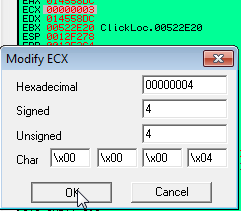
Once we arrive here, we can see that both EAX points to the "bad" string returned from the server while ECX contains its size of 3. In order to trick the program into believing it was authenticated by the server, we need to change the string "bad" to "good" and the size in ECX to 4, which is the length of the new string. Let's follow the dword of EAX in the dump so that we can alter the string value.


Now, let's simply change the value to "good".


Once you are finished, we just need to change the value of ECX to 4 so that it is the same length as our new string.


Now, let's run the program. If everything was done correctly,  we should arrive at the "Authenticated Successfully!" string 2 breakpoints later.


At this point, we simply need to press f8(step over) 8 times to arrive here:


At this point, follow the value of EDX, which was assigned by the instruction at 4DBF26 in the dump to get the path and name of the file that will be extracted.


Let's note this path and file name and press F8. After the called routine is finished, it will have extracted the protected file to the temp directory under the name we had above. Let's open our temp directory and find it.


As you can see, we have found our extracted file. If for some reason you are unable to see your file, it may  already have a super hidden attribute which is often the case with PDF files. In that case you need to change your folder settings to show hidden files and uncheck the option which says hide protected operating system files.


After doing this, you should be able to find your file. If I recall correctly, a pdf file may have a .tmp extension in order to better hide it. Once you have found the file, you can simply move it to a new directory, rename it if you like, and use the command line parameter attrib -s -h filename.ext to remove the supper hidden attribute if needed.


Once you are finished, you have successfully beaten this protection. Let's run the application to verify:


Now that we are finished, I must state that the goal of this tutorial was NOT to teach you how to pirate a ClickLocker protected product, but rather to show you that this product is not as strong as their website implies. A good DRM management software would employ encryption that could not be broken without a valid decryption key being supplied by the server upon activation. This is far from the case with ClickLocker. While my goal here is not to defame ClickLocker, I hope that you will consider these factors before using their low security product. Until next time, happy reversing.

Sunday, December 14, 2014

Unpacking Launch4j 3.5: Extracting The Jar File


Unpacking Launch4j 3.5: Extracting The Jar File:

Welcome to this short tutorial for unpacking Launch4j. Launch4j is a Java executable wrapper for Windows which makes the process of deploying a Java application on windows a little less arduous. It bundles the Java application with all of its command line arguments into a single executable and passes itself directly to the java runtime or "java.exe" upon execution. The goal of this tutorial is to show you how to recover/extract/unpack the original jar file and retrieve the command line arguments from the executable. While most protection detecting utilities do not detect launch4j, it is quite easy to identify this wrapper by using string references to find the string 'Launch4j'.

The application we will be working with is the demo project included with Launch4j called SimpleApp. It is located in the Launch4j installation directory in the folder '%Launch4j%\demo\SimpleApp\'. To begin, we will open our file 'SimpleApp.exe' in LordPE and click the sections button. This window will allow us to determine the Raw Offset and size of the resource section which usually has the name '.rsrc'.   

 As we can see in the picture, the raw offset is '6000h' and its raw size is '1C00h'. The jar file is always located directly after the end of the last section and spans all the way until the end of the file, so '6000h + 1C00h= 7C00h'. This means that 7C00h is the raw offset of the Jar file. Let's open the application up in winhex to verify.


As you can see here, we have reached the beginning of the Jar archive which is indicated by the 'PK' file type identifier. As stated above, the end of the archive will be the last byte in our file. In order to make sure we select everything correctly, we need to mark this offset as the 'beginning of block' through the right click menu.


Once you have done this, we can simply scroll to the last offset and mark it as the 'end of block'. 


This will automatically select all of the bytes in our archive and allow us to extract and save them as another file. To do this, right click the selection and click the 'Edit' button.


From here, another menu will appear. Go to the option 'Copy Block' and in the sub-menu, click 'Into New File'.


Afterwards, a save dialog will appear. In this example, I decided to name the file 'SimpleApp2.jar'.


After clicking save, let's run our extracted file and see the results.


As you can see, our extraction was successful and the file runs correctly, so our work is done. 

While this file runs correctly as is, in some cases, the author may pass additional command line arguments to the java runtime. If we do not recover these parameters, some applications may not run correctly.  To do so, we can open the original file in ollydbg and set a breakpoint on the API CreateProcessA. After running the application, we will shortly break here and we can read the arguments off of the stack. Below, we can look at the following example from another target.


In this example, we can can see that application is passing the parameters -Xms256M and -Xmx800M which tells the application the minimum and maximum ram amount to allocate to the process. Without these parameters, the application may not have the ram it requires to perform certain tasks. That is why it is crucial to recover these parameters to insure that the extracted jar will work correctly. 

Another approach to recovering these parameters would be to search for them with a resource editor. While this approach may not be as reliable as the one above, it may be best when working with malicious code.


In this example, I was able to find the parameters stored in the RC Data directory of the resource table. 

I hope that you were able to walk away with some new knowledge. If there is something that you are not quite able to grasp or understand, please feel free to post your questions or comments below. Until next time, happy reversing.